What Government Registrations Does My Business Need? (The Ultimate 2026 Checklist)
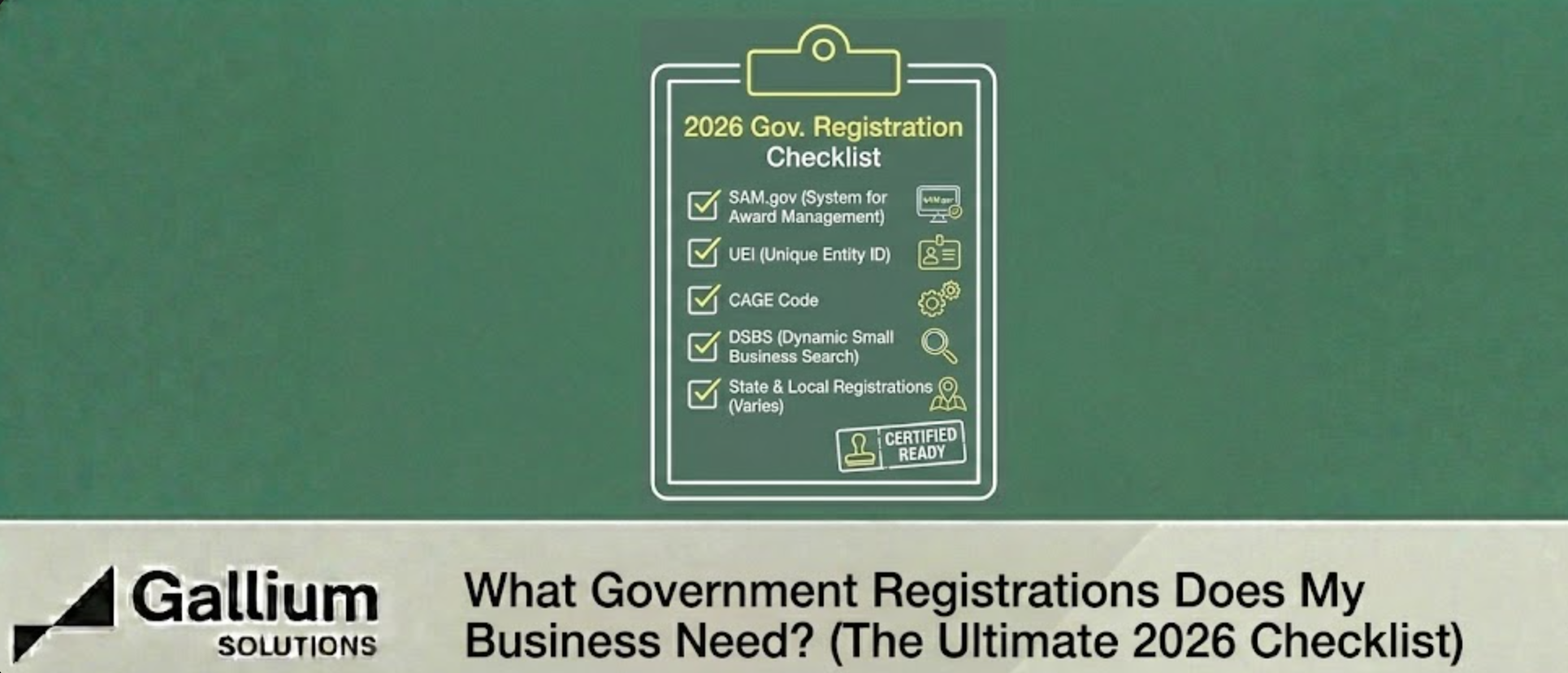
If you ask Google, you’ll get a thousand different acronyms. SAM, WAWF, DSBS, JCP, PIEE. It’s enough to make you quit before you start. The truth is, there isn't one list—there are several "layers" of registration, and the order in which you complete them matters.
If you do them out of order, you will get stuck in a verification loop.
This guide is your First 30 Days Roadmap. It breaks down exactly which registrations your business needs, why you need them, and the correct order to file them.
Phase 1: The Identity Layer (Day 1-7)
You cannot do anything else until these are active. Do not skip ahead.
1. The "Social Security Number": UEI & SAM.gov
What it is: The System for Award Management (SAM) is the master database of federal vendors.Why you need it: You cannot bid, get paid, or even talk to a Contracting Officer without an active SAM profile.The Steps:
- Get your UEI: Login to SAM.gov to request your Unique Entity ID (UEI). This replaces the old DUNS number.
- Tax ID Match: Your business name and address must match exactly what is on your IRS EIN letter. If you use "Inc." on one and "Inc" on the other, you will be rejected.
- Get your CAGE Code: You do not apply for a CAGE code separately. Once your SAM registration is processed (takes 10-14 days), the DLA will assign you a 5-character CAGE code automatically.
2. The "Marketing" Profile: DSBS
What it is: The Dynamic Small Business Search (DSBS).Why you need it: SAM is where you register; DSBS is where you get found. When a Contracting Officer needs to find a "Woman-Owned construction firm in Ohio," they search DSBS, not Google.The Trick: There is no "DSBS.gov." You access this profile through a hidden link on the last page of your SAM registration (labeled "SBA Supplemental Pages") or via SBA Connect. Most businesses leave this blank—don't be them. Fill it with keywords and your Capability Statement.
Phase 2: The Access Layer (Day 8-14)
Now that you exist, you need the keys to the building.
3. The "Access" Badge: JCP (Joint Certification Program)
What it is: A certification that lets you view "Export Controlled" or "Unclassified Technical Data."Why you need it: Have you ever tried to download an RFP on SAM.gov and saw a "Locked" icon on the attachments? That means the drawings are restricted. You need a JCP Certification (DD Form 2345) to unlock them.The Prerequisite: You must have an active CAGE code (Phase 1) before applying.
4. The "Payment" Portal: PIEE & WAWF
What it is: The Procurement Integrated Enterprise Environment.Why you need it: This system houses Wide Area Workflow (WAWF), the only tool the DoD uses to pay invoices.2026 Update: PIEE is now also used to post solicitations. If you aren't registered, you might be blocked from submitting proposals for Navy and Air Force contracts.The Action: Register as a "Vendor" and appoint yourself the Contractor Administrator (CAM).
Phase 3: The Compliance Layer (Day 15-30)
You can bid without these, but you won't get the award.
5. The "Cyber" Score: SPRS
What it is: The Supplier Performance Risk System.Why you need it: As of late 2025, you cannot be awarded a DoD contract without a current NIST 800-171 Self-Assessment score posted here.The Task: You must conduct a self-audit of your cybersecurity (do you use 2-factor authentication? Do you lock your doors?) and upload your score. A perfect score is 110. A negative score is allowed for now, but a missing score is a disqualifier.
6. The "Set-Aside" Portal: MySBA
What it is: The consolidated home for all socio-economic certifications (certifications.sba.gov).Why you need it: If you are a Veteran, Woman, or Minority-owned business, you must apply here to be eligible for "Set-Aside" contracts.Crucial Note: Self-certification for SDVOSBs (Service-Disabled Veteran-Owned) is dead. You must be certified through MySBA to compete for VA or DoD set-asides.